
This is an old revision of the document!
Table of Contents
Automatic Greenhouse Ventilation
Author: Alexander Staub (23553)
1. Introduction
This project implements an automated greenhouse ventilation system using Home Assistant. The project is personal: my grandparents have a Schrebergarten with a greenhouse where they grow vegetables such as cucumbers and tomatoes. During warm summer periods, the greenhouse climate can drift away from crop-friendly conditions, which makes ventilation a recurring manual task that is often needed every evening.
Greenhouses are designed to provide plants with more optimally controlled microclimate conditions. However, if temperature and humidity are not managed properly, crop quality and yield can be negatively affected, which is why greenhouse automation and control focus strongly on microclimate parameters such as air temperature and relative humidity. [1]
Because manual ventilation is repetitive and not always possible on time, an automation approach can help keep conditions closer to target ranges and reduce day-to-day workload.
1.2 Project goal
The main goal is to automate the ventilation process so that the greenhouse can be ventilated reliably based on sensor readings and control rules. The intended outcome is a system that:
- monitors temperature and humidity,
- triggers ventilation when needed (especially during warm periods),
- reduces the need for daily manual intervention,
- provides a practical stepping stone for later upgrades and extensions.
1.3 Target climate ranges (definition of success)
- Target air temperature: 15–27 °C
- Target relative humidity: 50%-70% a moderate range that supports growth while reducing the risk of condensation, fungal disease and mold
These ranges are used as engineering targets for automation rules and later evaluation in testing. They are not strict biological limits, but a sensible operating window for typical warm-season greenhouse crops such as tomatoes and cucumbers, where excessive heat and persistently high humidity increase disease pressure. [1][2]
1.4 Constraints and assumptions
- Greenhouse volume: ~16 m³
- No active heating/cooling: the current setup focuses on ventilation only (no active heater/ cooler installed)
- Offline operation: must work without an internet connection
- Home Assistant: monitoring and automation are implemented using Home Assistant
2. System Overview
2.1 High-level architecture
The core system consists of two temperature/humidity sensors and one switching actuator:
- Sensors: two DHT11 sensors (temperature + relative humidity)
- 1× inside the greenhouse
- 1× outside the greenhouse
- Actuator: ventilation fans connected to a relay module
- Controller: an ESP32 running ESPHome
- Automation platform: Home Assistant receives the sensor readings and controls the relay based on defined conditions.
Data flow is: DHT11 (inside/outside) → ESP32 (ESPHome) → Home Assistant → ESP32 (ESPHome) → Relay → Fans.
2.2 Control concept
Because the current scope uses fans only (no heating/dehumidifier), the system can influence the greenhouse climate mainly by exchanging inside air with outside air. The automation therefore compares inside conditions against outside conditions and only ventilates when outside air is expected to improve the inside climate.
Although the DHT11 sensors only measure air temperature and relative humidity, these values can be used to calculate the dew point. Dew point is helpful because it is a direct indicator of how close the air is to saturation and therefore to condensation on cold surfaces (e.g., glass), which can promote fungal diseases. In addition, dew point reflects the air’s moisture state more robustly than relative humidity alone, which is temperature-dependent and can appear “high” even when the absolute moisture content is not. This makes dew point a useful metric when deciding whether exchanging inside air with outside air is likely to reduce condensation risk and improve the greenhouse climate.
Definitions:
- T_in, T_out = inside/outside temperature
- RH_in, RH_out = inside/outside relative humidity
- DP_in, DP_out = inside/outside dew point (calculated)
1. Extreme temperature control (highest priority, ignores humidity): Goal: prevent heat stress fast.
Start fans if:
- T_in ≥ 29 °C AND T_out < T_in − 0.5%
Stop fans when:
- T_in ≤ 28.5 °C
No humidity/dew point checks here. This is “save the plants” mode.
2. Normal temperature control (humidity-safe cooling) Goal: cool only when it won’t significantly worsen moisture/mold risk.
Start fans if:
- 27 °C < T_in < 29 °C
- AND T_out < T_in − 0.5%
- AND DP_out ≤ DP_in + 1%
Stop fans when:
- T_in ≤ 26.8 °C OR outside is no longer favorable
This allows cooling even if outside dew point is slightly higher, but blocks cases where outside air is much wetter.
3. Humidity-driven ventilation (dehumidification, can run even if outside is warmer) Goal: keep RH_in < 70% and reduce mold pressure.
Start fans if:
- RH_in > 70%
- AND T_out ≤ 27 °C
- AND outside air is truly drier: DP_out < DP_in − 0.7%
Stop fans when:
- RH_in < 68%
- OR T_out > 27 °C
- OR DP_out ≥ DP_in − ΔDP (outside no longer helps)
If outside dew point is lower, exchanging air will reduce moisture even if outside is warmer.
3. Components
3.1 Sensors
The system uses two identical DHT11 temperature and relative humidity sensors (one inside, one outside). A DHT11 module variant was selected (instead of the bare sensor) because it includes the necessary supporting components (e.g., pull-up resistor) and is therefore easy to connect in a plug-and-play manner to the ESP32. [C1]
3.2 Actuators
3.2.1 Fans
Ventilation is implemented with four 12 V / 92 mm brushless DC axial fans (dual ball bearing) to exchange air between the greenhouse and the outside environment. The selected fan type is specified with an airflow of 54.8 CFM per fan (manufacturer specification). [C2]
Based on the greenhouse volume of 16 m³ and the theoretical total airflow:
- Total airflow (theoretical): 4 × 54.8 CFM = 219.2 CFM
- 219.2 CFM ≈ 372.6 m³/h
- Air exchange time (theoretical): 16 m³ / 372.6 m³/h ≈ 0.043 h ≈ 2.6 minutes per air change
This calculation is an idealized estimate. Real-world air exchange will typically be lower due to pressure losses, airflow short-circuiting (intake to exhaust), insect mesh, bends, and imperfect sealing.
3.2.2 Relay module
Fan power switching is done via a 4-channel 5 V relay module. Only two relay channels are used in this project: one for the intake fan group and one for the exhaust fan group. [C3]
3.3 Compute & networking
3.3.1 Home Assistant host
Home Assistant runs on Home Assistant Green, which is designed as a dedicated, low-power Home Assistant hub with preinstalled Home Assistant OS. [C4]
3.3.2 Microcontroller
Sensor readings and relay control are handled by an Olimex ESP32-POE-ISO running ESPHome. This board integrates Ethernet + PoE support and provides galvanic isolation on the PoE side (useful for robustness in longer cable runs and electrically “noisy” environments). [C5]
3.3.3 Local network
To ensure operation without an internet connection, a small local WLAN + DHCP setup is used:
- TP-Link TL-WR840N (N300) as local Wi-Fi router for Home Assistant UI access and DHCP server to enable communication between the Home Assistant Green and the ESP32. [C6]
- TP-Link TL-POE160S PoE+ injector to deliver both network and power over a single Ethernet cable to the greenhouse side. [C7]
- REVODATA Gigabit PoE splitter (12 V / 2 A) to separate data and provide 12V DC in the greenhouse. [C8]
3.4 Power conversion
Inside the greenhouse-side electronics, a DC-DC buck converter is used to derive 5V for the ESP32/relay electronics from the available DC supply. [C9]
4. Implementation
4.1 Physical setup & wiring
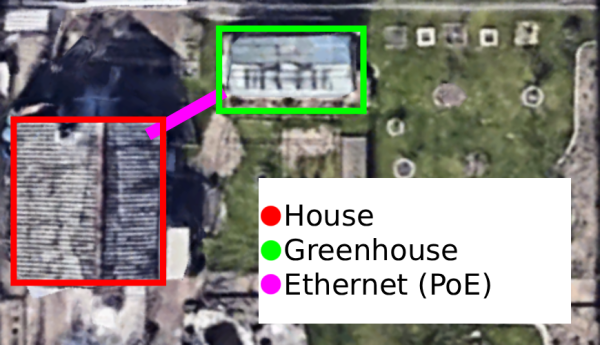
The physical implementation is split into two levels of detail: a top-down overview of the garden layout and a detailed networking, wiring and placement description.
4.1.1 Top-down system overview
In the garden house, the central infrastructure components are installed:
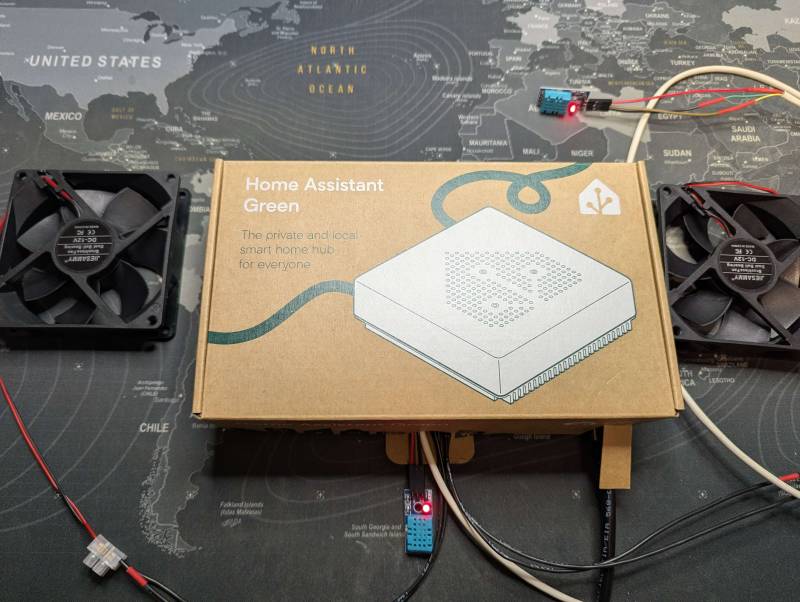
- Home Assistant Green
- Local Wi-Fi router (DHCP + UI access)
- PoE injector
From this location, a single Ethernet cable is routed to the greenhouse. This cable provides the network connection and the power delivery (via PoE) required for the greenhouse-side electronics:
- 4x 12V Fans
- 12V → 5V Buck Converter
- ESP32
- Relay
- 2x DHT11 Sensors
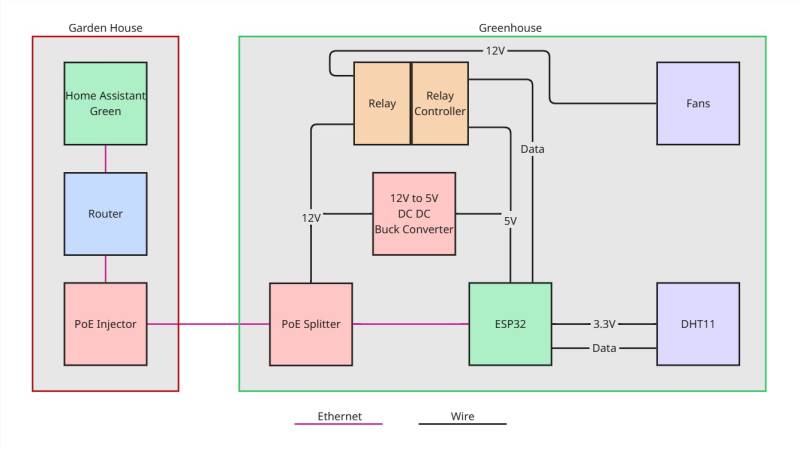
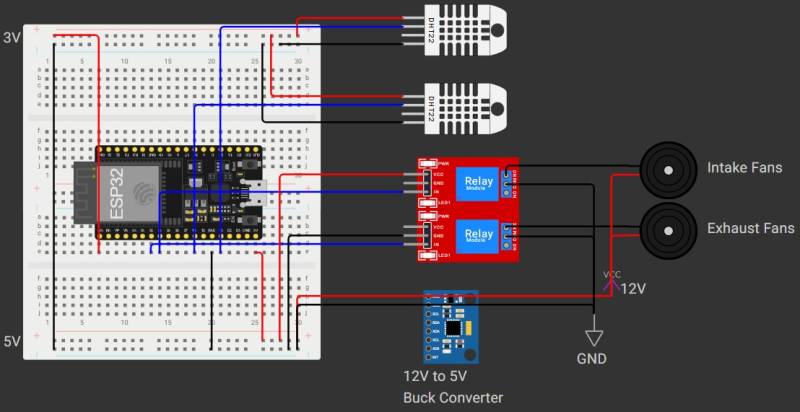
4.1.2 Network and power wiring
Inside the garden house:
- Router
- Home Assistant Green (LAN connection)
- PoE injector (LAN input)
Ethernet cable from the PoE injector to the PoE Splitter in the greenhouse. The PoE splitter separates network and power:
- Data (Ethernet)
- ESP32 (LAN connection)
- Power (12V DC, 2A)
- Fan power circuit (12V; seperated in intake and exhaust groups using two relay channels)
- 12V → 5V buck converter
- ESP32 (5V input)
- ESP32 (3.3V output)
- DHT11 Sensors
- Relay controller
4.1.3 Power budget
The greenhouse-side system is poweder via the PoE Splitter with a rated budget of 12V 2A. Measured current per fan:
- 0.31 A with open airflow (normal / low restriction)
- 0.35 A with bad airflow (higher restriction)
- 0.46 A startup peak
With 4 fans total, this results in:
- Normal airflow: 4 × 0.31 A = 1.24 A
- Bad airflow: 4 × 0.35 A = 1.40 A
- Startup peak: 4 × 0.46 A = 1.84 A
Measured 5 V rail current (ESP32 + relay + DHT sensors):
- 0.10 A idle
- 0.25 A under load
Converted to an equivalent 12 V input current assuming 80% buck converter efficiency:
- Idle: (5 V × 0.10 A) / (12 V × 0.8) = 0.052 A
- Load: (5 V × 0.25 A) / (12 V × 0.8) = 0.130 A
Worst-case steady-state (bad airflow + electronics under load):
- Total ≈ 1.40 A + 0.13 A = 1.53 A
- Margin to 2.00 A ≈ 0.47 A (about 24%)
Worst-case startup (all fans starting at once + electronics under load):
- Total ≈ 1.84 A + 0.13 A = 1.97 A
- Margin to 2.00 A ≈ 0.03 A (about 1.5%)
Because starting all four fans simultaneously would bring the total current draw very close to the splitter’s limit, a staggered startup procedure is used so that the fans do not reach their peak inrush current at the same time.
4.2 Enclosure
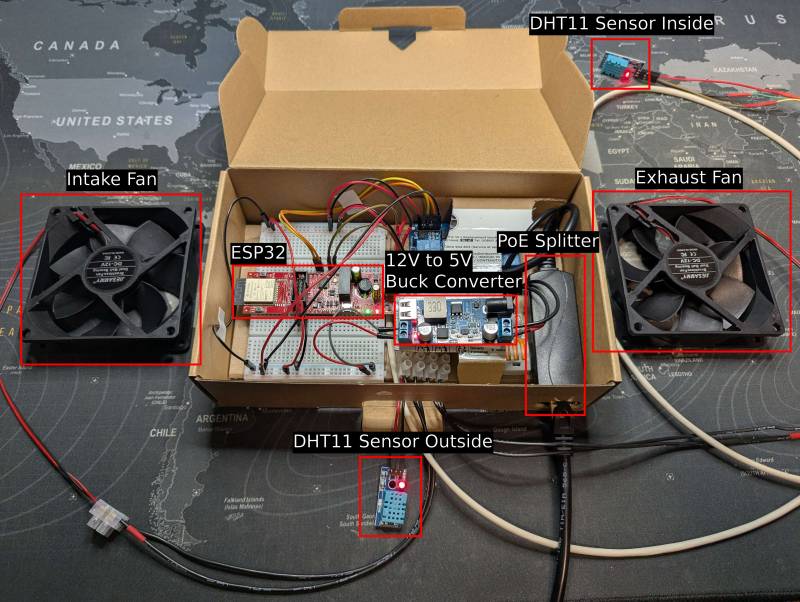
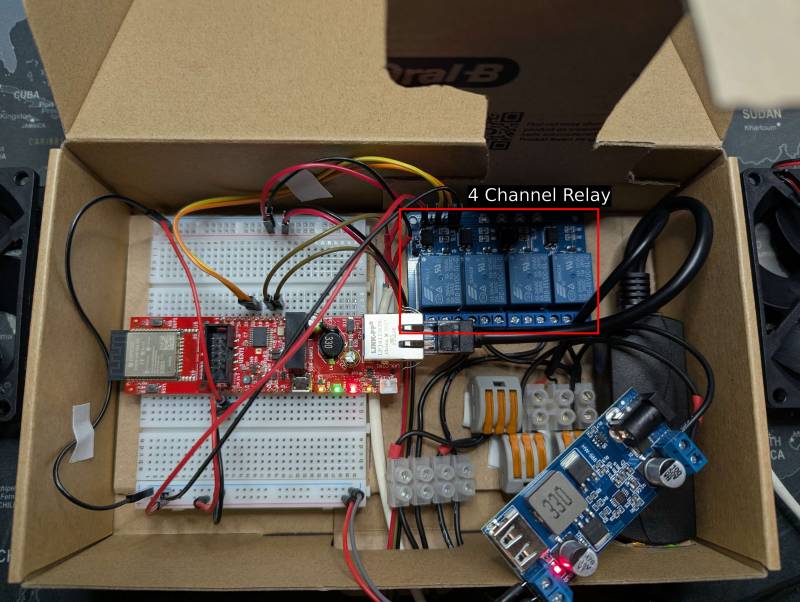
All greenhouse-side electronics (PoE splitter, ESP32, buck converter, breadboard/power distribution, and relay module) are installed in a dedicated enclosure.
4.3 Enclosure, Sensor and Fan placement
The enclosure is mounted on the inside of the greenhouse door, which keeps cable runs short to the door-mounted fans and simplifies installation and maintenance.
Sensor placement is designed to capture both the internal climate and the incoming outside conditions:
- Outside sensor
- Mounted outside, towards the bottom area of the greenhouse (near air intake level)
- Inside sensor
- Mounted inside, in the middle-to-upper part of the greenhouse
Ventilation placement follows a classic “bottom intake / top exhaust” strategy:
- Intake fans
- Installed at the bottom of the door (draw in cooler outside air)
- Exhaust fans
- Installed near the top (remove warm, humid air that accumulates above)
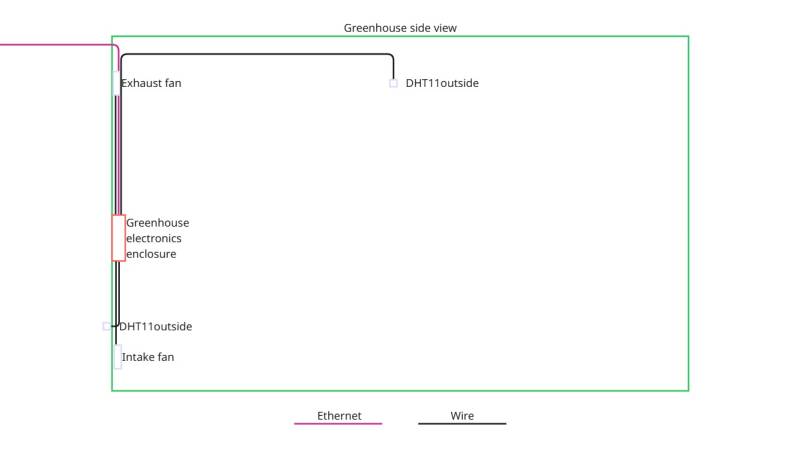
Because the electronics enclosure is mounted on the greenhouse door while the Ethernet feed and the inside sensor cable are routed to fixed points, both cables are installed with sufficient slack to accommodate the door movement without putting strain on connectors or wiring.
4.4 Software setup
For the initial setup and for installing updates, a temporary internet connection is required. After installation, the system is designed to run locally without requiring internet access for normal operation.
4.4.1 Home Assistant version
The project was implemented with the following Home Assistant versions:
- Home Assistant Core: 2026.2.3
- Home Assistant Supervisor: 2026.02.2
4.4.2 Installing ESPHome (ESPHome Device Builder)
ESPHome was installed following the official guide [S1], alternatively by installing the add-on directly in Home Assistant:
- Home Assistant
- Settings → Apps → Install App
- ESPHome Device Builder
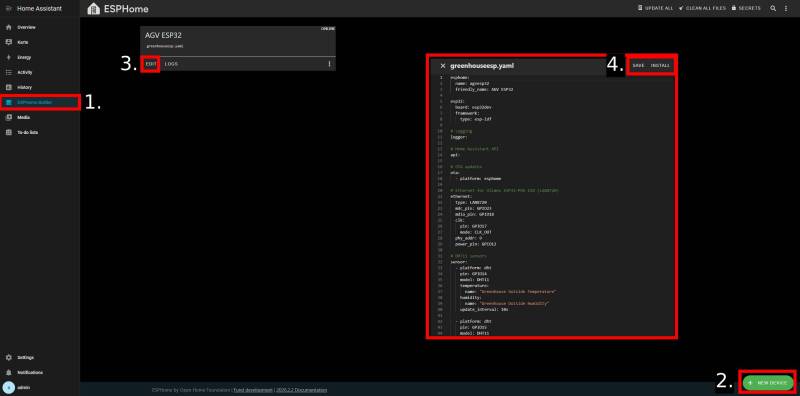
To flash the ESP32 with ESPHome for the first time, the ESP32 is connected via USB to the Home Assistant Green device. In ESPHome Device Builder a new device configuration is created and then installed:
- ESPHome Device Builder
- New Device
- Continue
- Empty Configuration
- Name device
- EDIT (add yaml config)
- SAVE
- Install
The initial installation step can require internet access because ESPHome may download required build packages and platform dependencies.
4.4.3 ESPHome configuration (YAML)
The following ESPHome configuration was used to integrate the Ethernet-enabled ESP32 controller, two DHT11 sensors, and the relay outputs.
- greenhouseesp.yaml
esphome:
  name: agvesp32
  friendly_name: AGV ESP32

esp32:
  board: esp32dev
  framework:
    type: esp-idf

# Logging
logger:

# Home Assistant API
api:

# OTA updates
ota:
  - platform: esphome

# Ethernet for Olimex ESP32-POE-ISO (LAN8720)
ethernet:
  type: LAN8720
  mdc_pin: GPIO23
  mdio_pin: GPIO18
  clk:
    pin: GPIO17
    mode: CLK_OUT
  phy_addr: 0
  power_pin: GPIO12

# DHT11 sensors
sensor:
  - platform: dht
    pin: GPIO14
    model: DHT11
    temperature:
      name: "Greenhouse Outside Temperature"
    humidity:
      name: "Greenhouse Outside Humidity"
    update_interval: 10s

  - platform: dht
    pin: GPIO15
    model: DHT11
    temperature:
      name: "Greenhouse Inside Temperature"
    humidity:
      name: "Greenhouse Inside Humidity"
    update_interval: 10s

# Relay outputs
switch:
  - platform: gpio
    pin: GPIO32
    inverted: true
    id: relay_1
    name: "Greenhouse Relay Intake"
    restore_mode: RESTORE_DEFAULT_OFF

  - platform: gpio
    pin: GPIO33
    inverted: true
    id: relay_2
    name: "Greenhouse Relay Exhaust"
    restore_mode: RESTORE_DEFAULT_OFF

  - platform: template
    name: "Greenhouse Ventilation"
    id: ventilation_sequence
    lambda: |-
      return id(relay_1).state && id(relay_2).state;
    turn_on_action:
      - switch.turn_on: relay_1
      - delay: 1s
      - switch.turn_on: relay_2
    turn_off_action:
      - switch.turn_off: relay_2
      - switch.turn_off: relay_1
ESPHome provides many ready-to-use components which can be configured declaratively and are documented on the ESPHome website. [S2]
- logger
- Enables runtime logs for debugging and monitoring during development.
- api
- Connects the device to Home Assistant using the native ESPHome API.
- ota
- Enables over-the-air firmware updates after the initial USB flash.
- ethernet (LAN8720)
- Configures the Olimex ESP32-POE-ISO Ethernet interface for reliable wired connectivity.
- sensor: platform dht (model DHT11)
- Reads temperature and relative humidity from each DHT11 sensor at a defined update interval.
- switch: platform gpio
- Controls relay channels through ESP32 GPIO pins (inverted logic is used to match the relay board behavior).
- switch: platform template
- Provides a single logical “ventilation” switch that turns intake and exhaust on/off in a controlled sequence (intake first, then exhaust after a short delay).
4.5 Home Assistant entities, dashboard, and automations
In the Home Assistant overview, compatible devices can be discovered by scanning the local network. If the ESPHome firmware (YAML configuration) was installed successfully on the ESP32, a device with the configured name AGV ESP32 should appear and can be added to Home Assistant.
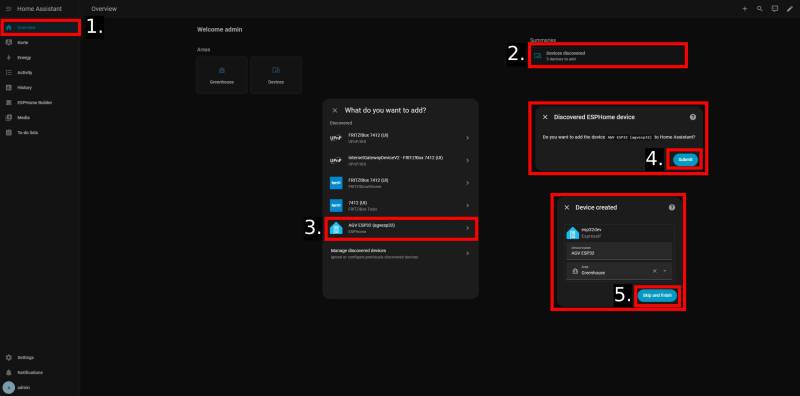
4.5.1 Entities and dashboard
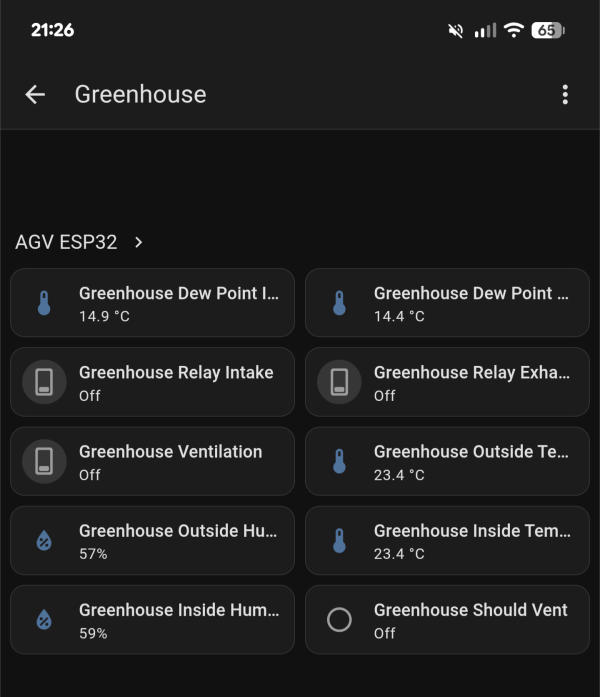
After pairing the ESPHome device with Home Assistant, the following entities become available (example naming as configured in ESPHome):
- Greenhouse Outside Temperature
- Greenhouse Outside Humidity
- Greenhouse Inside Temperature
- Greenhouse Inside Humidity
- Greenhouse Relay Intake
- Greenhouse Relay Exhaust
- Greenhouse Ventilation
These entities are visualized on a dedicated dashboard to monitor current conditions and to manually override ventilation if required.
To add automatic calculations of the dew points for inside and outside Templates are used. [S3]
Following the quickling in the Template Documentation or under Settings → Devices & services → Helpers → + Create helper → Template → Sensor we fill in Name, State (shown below), Unit of measurement (°C), Device class (Temperature), State class (Measurement) and select our ESPHome as device. This adds a sensor we can access with sensor.<Name> that calculates the dew point.
- inside dew point.txt
{% set T = states('sensor.agv_esp32_greenhouse_inside_temperature')|float(none) %}
          {% set RH = states('sensor.agv_esp32_greenhouse_inside_humidity')|float(none) %}
          {% if T is not none and RH is not none and RH > 0 %}
            {% set a = 17.62 %}
            {% set b = 243.12 %}
            {% set gamma = (a * T) / (b + T) + log(RH / 100) %}
            {{ ((b * gamma) / (a - gamma)) | round(2) }}
          {% else %}
            {{ none }}
          {% endif %}
4.5.2 Automations
The ventilation control logic is implemented using Home Assistant automations. This includes temperature-driven ventilation and humidity-driven ventilation rules based on comparing inside vs. outside conditions.
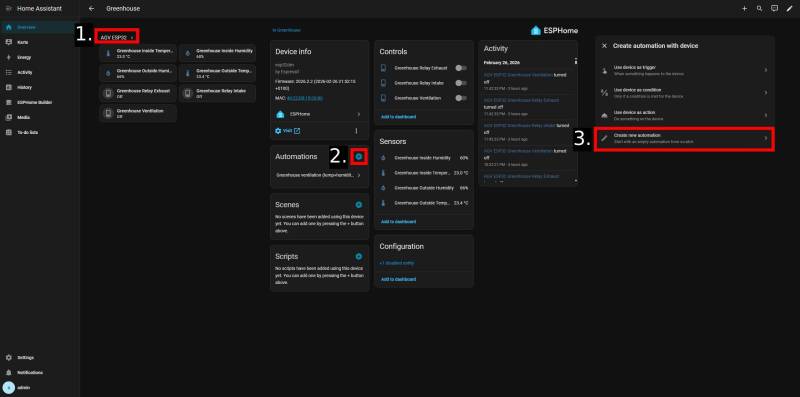
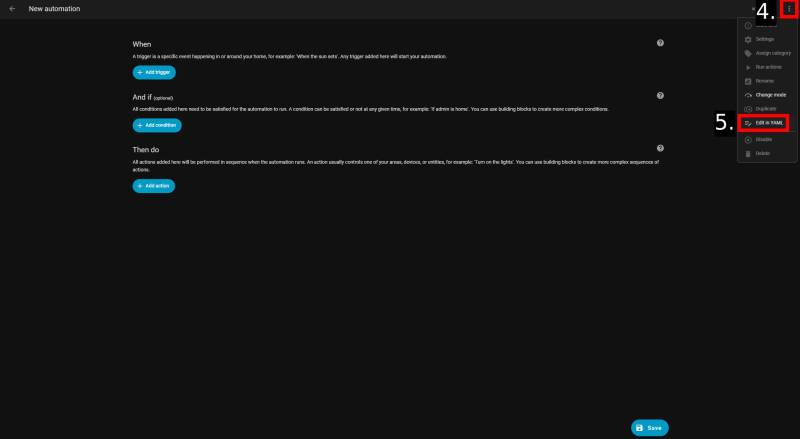
The following YAML file specifies the criteria that Home Assistant uses to determine when to activate the ventilation system based on 2.2 Control concept.
- automation.yaml
alias: Greenhouse ventilation (temp+humidity instant on, delayed off)
triggers:
  - id: vent_on
    for: "00:00:30"
    value_template: >
      {% set tin =
      states('sensor.agv_esp32_greenhouse_inside_temperature')|float(0) %} {%
      set tout =
      states('sensor.agv_esp32_greenhouse_outside_temperature')|float(0) %} {%
      set hin = states('sensor.agv_esp32_greenhouse_inside_humidity')|float(0)
      %} {% set hout =
      states('sensor.agv_esp32_greenhouse_outside_humidity')|float(0) %} {{
        (tin > 27 and tout < 27)
        or
        (hin > 70 and hout < 70 and tout < 27)
      }}
    trigger: template
  - id: vent_off
    for: "00:02:00"
    value_template: >
      {% set tin =
      states('sensor.agv_esp32_greenhouse_inside_temperature')|float(0) %} {%
      set tout =
      states('sensor.agv_esp32_greenhouse_outside_temperature')|float(0) %} {%
      set hin = states('sensor.agv_esp32_greenhouse_inside_humidity')|float(0)
      %} {% set hout =
      states('sensor.agv_esp32_greenhouse_outside_humidity')|float(0) %}

      {% set temp_reason_gone = (tin < 26.8) or (tout >= 27) %} {% set
      hum_reason_gone  = (hin < 68) or (hout >= 70) or (tout >= 27) %}

      {{ temp_reason_gone and hum_reason_gone }}
    trigger: template
actions:
  - choose:
      - conditions:
          - condition: trigger
            id: vent_on
        sequence:
          - target:
              entity_id: switch.agv_esp32_greenhouse_ventilation
            action: switch.turn_on
      - conditions:
          - condition: trigger
            id: vent_off
        sequence:
          - target:
              entity_id: switch.agv_esp32_greenhouse_ventilation
            action: switch.turn_off
mode: single
5. Testing & Validation
5.1 Test plan
At the time of writing, the ventilation system could not be tested in the real greenhouse environment because a new greenhouse is currently under construction. Testing was therefore performed at home. While this limits realism, it enables a more controlled environment and repeatable test scenarios. The bathroom was chosen as the test environment because its volume of approximately 8 m³ is suitable for controlled ventilation experiments using one intake and one exhaust fan. This two-fan setup provides a comparable air exchange rate to the greenhouse design, because halving both the room volume (16 m³ → ~8 m³) and the number of fans (4 → 2) keeps the ventilation capacity per volume in a similar range under ideal conditions. In addition, temperature can be increased in a predictable way using a heater, and relative humidity can be raised quickly and measurably (e.g., through shower steam). This makes it possible to evaluate the system by observing how temperature and humidity change when the fans are enabled.
Planned scenarios include:
- Hot-day / evening cooling scenario (temperature-driven ventilation)
- Humidity rise scenario (humidity-driven ventilation)
- Sensor sanity check (plausibility and stability of readings)
- Mode comparison tests
- Intake only
- Exhaust only
- Intake + exhaust (normal operation)
5.2 Data collection and logging
Measurements (inside/outside temperature and humidity) and actuator states (intake/exhaust/ventilation) are recorded using the ESPHome Logs. This provides a unified view of sensor time series and fan switching events and supports manual notes during testing.
5.3 Observations
- Placeholder: key observations will be documented here once testing is completed.
- Placeholder: include plots/screenshots from Home Assistant history and summarize relevant events (fan on/off, setpoint reached).
- Placeholder: note any unexpected behavior (e.g., oscillation, sensor lag, relay switching issues).
6. Results & Discussion
6.1 Results
6.2 Limitations
The current evaluation has several limitations:
- Testing was performed in a bathroom rather than a real greenhouse, so airflow patterns, heat capacity, and leakage behavior differ significantly.
- The controlled tests mainly covered cases where the “inside” environment was hotter and/or more humid than the “outside” reference. Conditions such as rain events, strong solar radiation, and rapid outside fluctuations were not fully represented.
Sensor limitations: DHT11 sensors are low accuracy, especially for humidity (often ±5% RH or worse, plus slow response).
7. Future Work Ideas
Here are a few ideas for future development, other than the actual deployment in the greenhouse.:
- Add additional sensors
- Soil moisture sensing
- Light and CO₂ sensing for improved climate control decisions
- Extend automation capabilities
- Automatic watering based on soil moisture and schedules
- Artificial light
- Absolute humidity based ventilation decisions
- Add active climate devices (beyond fans)
- Heater/ Active cooling
- Humidifier / dehumidifier system
- Off-grid power design outlook
- Plan and implement a battery/solar-based power supply so the system can operate independently of mains power.
- Include power budgeting, safety (fusing), and autonomy targets (e.g., nights / multiple cloudy days).
8. References / Sources
- [1] Shamshiri, Redmond & Jones, James & Thorp, Kelly & Ahmad, Desa & Che Man, Hasfalina & Taheri, Sima. (2018). Review of optimum temperature, humidity, and vapour pressure deficit for microclimate evaluation and control in greenhouse cultivation of tomato: a review. International Agrophysics. 32. 287-302. 10.1515/intag-2017-0005.
- [C1] DHT11 module (plug-and-play): https://www.amazon.de/dp/B07TSF94KD
- [C2] 12V 92mm fans (54.8 CFM spec): https://www.amazon.de/dp/B0FJ8D4Z3W
- [C3] 4-channel 5V relay module: https://www.amazon.de/dp/B01M8G4Y7Z
- [C4] Home Assistant Green: https://www.home-assistant.io/green/
- [C5] Olimex ESP32-POE-ISO: https://www.olimex.com/Products/IoT/ESP32/ESP32-POE-ISO/open-source-hardware
- [C6] TP-Link TL-WR840N router: https://www.amazon.de/dp/B00HNFP4HO
- [C7] TP-Link TL-POE160S PoE+ injector: https://www.amazon.de/dp/B08R3ZHZ78
- [C8] REVODATA PoE splitter 12V/2A: https://www.amazon.de/dp/B08HS4NT13
- [C9] 12V→5V buck converter: https://www.amazon.de/dp/B0BCV6GRH5
- [S1] ESPHome Getting Started (Home Assistant add-on): https://esphome.io/guides/getting_started_hassio/
- [S2] ESPHome DHT sensor component documentation: https://esphome.io/components/sensor/dht/
- [S3] Home Assistant Template documentation: https://www.home-assistant.io/integrations/template/